Color Pop YouTube Branding Kit: Your DIY Channel Makeover
Building a recognizable YouTube channel from scratch feels overwhelming. You're juggling content ideas, filming, editing, and trying to make your videos look polished. Meanwhile, your channel art might be a quick screenshot or a template that doesn't quite fit. The Color Pop YouTube Branding Kit Canva DIY solves this problem by giving you a cohesive visual system you can customize yourself without hiring a designer or learning complex software.
What Exactly Is This Branding Kit?
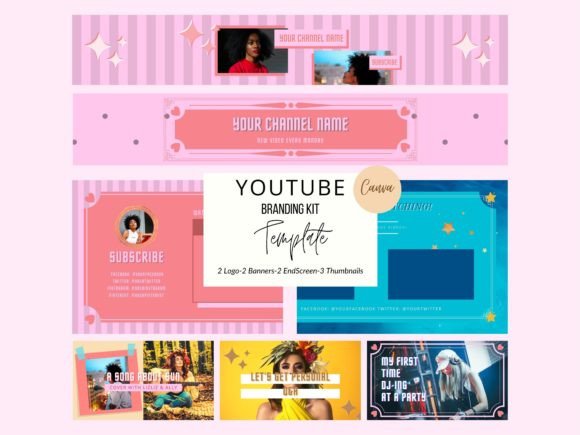
Think of it as a starter pack for your channel's visual identity. This is a professionally designed set of templates that all work together, creating a unified look across every touchpoint where a viewer encounters your brand. The kit includes two YouTube logos at 500 by 500 pixels, two channel art banners at 2540 by 1440 pixels, two end screen cards at 1920 by 1080 pixels, and three thumbnail templates at 1280 by 720 pixels. Each element shares the same color palette, typography choices, and design language, which means your channel instantly looks intentional and professional the moment you apply these assets.
The visual personality of this kit leans into bold, saturated color choices paired with clean modern typography. It avoids overly trendy design elements that would feel dated in six months. Instead, the aesthetic balances energy with clarity. You'll notice strong color contrast, thoughtful whitespace, and layouts that guide the eye naturally from one element to the next. This approach to brand identity means your channel communicates confidence without shouting.
Why Cohesive Branding Matters More Than You Think
Viewers make snap judgments. When someone lands on your channel page and sees mismatched graphics, inconsistent fonts, or generic imagery, they make assumptions about your content quality before pressing play. A unified visual system built with tools like the Color Pop YouTube Branding Kit Canva DIY does something powerful: it builds trust through consistency. Your logo design, thumbnails, and end screens all reinforce the same message, which helps viewers remember you and return to your channel.
From a practical standpoint, consistent branding also streamlines your workflow. Instead of staring at a blank canvas every time you need a new thumbnail or banner, you start with a template that already fits your aesthetic. You change the text, drag in your photos, and you're done. This is especially valuable for creators uploading multiple times per week. The templates function as a design asset library rather than a one-off purchase, saving you hours over the life of your channel.
Editing in Canva: A Realistic Walkthrough
After purchasing the kit, you receive a PDF containing shared links to each template. Clicking those links opens them directly in Canva, which is a free online design platform. If you've never used Canva before, the learning curve is gentle. Layers are well-organized, so you can select individual elements, change colors, swap fonts, and replace placeholder images without accidentally breaking the layout.
Here's what the actual editing process looks like in practice. Open a thumbnail template. Click on the placeholder text and type your video title. Adjust the font size if your title is longer or shorter than the sample. Click on the image area and upload your own photo, then drag it into position. The kit's modern typography choices remain intact, so even if you swap colors to match a specific video topic, the overall design still feels cohesive. Export as a PNG, and your thumbnail is ready to upload.
One important detail worth noting: the intro and outro elements are meant to be added in your video editing software, not in Canva. The PDF instructions explain this clearly. Think of Canva as your social media graphics production tool and your video editor as where you assemble the final piece.
Who Benefits Most From This Kit?
New YouTubers gain the most immediate value. If you're launching a channel and don't have a design budget, this kit gives you professional-looking assets on day one. But experienced creators benefit too, especially those rebranding or tightening up an inconsistent visual presence. Small business owners using YouTube for marketing find it particularly useful because the polished look supports credibility with potential customers.
Content creators in lifestyle, beauty, tech, education, fitness, and vlogging niches will find the color-forward aesthetic works well. The bold palette naturally draws attention in crowded feeds, which matters when viewers scroll through dozens of thumbnails. The display font choices in the kit are selected for screen readability at small sizes, so your titles remain legible even on mobile devices where most YouTube browsing happens.
Practical Tips for Getting the Most Out of Your Templates
Customize beyond just swapping text. Adjust the color palette slightly for different content series within your channel. If you have a weekly Q&A and a separate tutorial series, use the same template structure but shift the dominant color. This creates visual variety while maintaining the overarching brand identity that makes your channel recognizable.
Test your thumbnails at actual display size before publishing. What looks great at full resolution in Canva might lose impact when it appears as a small rectangle on someone's phone. Zoom out or view the exported thumbnail on your own device to check readability. The Color Pop YouTube Branding Kit Canva DIY templates are designed with this consideration in mind, but your specific text length and image choices affect the final result.
Keep your original template files untouched. Duplicate them in Canva each time you start a new project. This way, you always have a clean starting point, and you avoid the frustration of accidentally overwriting your master template with video-specific edits.
The Bigger Picture: Templates as a Brand Strategy Tool
Using a kit like this isn't just about making things look nice. It's a strategic decision. When your visual presentation is handled, you free up mental energy for what actually grows your channel: creating better content, engaging with your audience, and refining your message. The Color Pop YouTube Branding Kit Canva DIY removes the design bottleneck that stops many creators from presenting themselves professionally, and that shift in how you show up online compounds over time into stronger audience recognition and engagement.